AI automation · Completed
Daily Sublime Automation: n8n and Claude workflows that ran a one-person art magazine
- Role
- Founder; designed and built the workflows
- Client / context
- Own product: The Daily Sublime
- Headline figure
- 56 s — for Claude to write one issue
The Daily Sublime was a 30-issue art magazine by email that I ran alone. Three n8n workflows with Claude did the back-office work: one wrote each issue, one checked its links, and one drafted a personal email to each YouTube creator. Nothing went to a stranger before I had read it.
Executive impact summary
- Problem
- A daily art magazine needs research, writing, six pictures and a send for every issue, plus outreach to find readers. That is too much for one person to do by hand every day.
- Psychology used
- Trust in automation: the AI writes, real sources and code supply what must be exact, such as picture links, and a person checks anything that goes to a stranger. For outreach, personal relevance: every email opens with something specific about that creator's own channel.
- Methods
- n8n workflows · Claude for writing · Wikimedia Commons search for pictures · Google Sheets for issues and readers · Gmail for sending and drafts · Google Apps Script for sign-ups
- Outcome
- Starting with issue 8, the workflow wrote the issues and looked up their pictures. Issues went out automatically at 8:00 in the morning between December 2025 and March 2026, and about 80 personal outreach emails were drafted by Claude and checked by me before sending.
Behind the scenes
How the automation worked
I ran The Daily Sublime on my own, so I built its back office as n8n workflows with Claude. One workflow wrote each issue, one checked its links, and one drafted personal emails to YouTube creators. Google Sheets held the issues and the readers, sign-ups went into the sheet through a small Google Apps Script, and Gmail sent the email.
Built with
- n8n
- Claude
- Wikimedia Commons API
- Google Sheets
- Gmail
- Google Apps Script
- 01
Issue writer
Turns one day number into a complete issue.
- I type a day number in n8n's chat.
- n8n finds that day's painter in a Google Sheet and stops if the issue already exists.
- It collects the practices, music and poems of earlier issues, so Claude does not reuse them.
- Claude writes the issue: a hook, why the painter matters, five things to notice, a short practice, a true story with its source, music and a poem.
- n8n searches Wikimedia Commons for the five paintings and the painter's portrait, so the picture links come from the source and not from the AI.
- n8n saves all 43 fields back into the sheet, where the email template picks them up.

The issue writer workflow in n8n. Swipe sideways to see all of it. - 02
Link checker
Makes sure every picture and source in an issue opens.
- n8n reads the issue and checks every image and source link.
- If a link is broken, Claude suggests a replacement.
- n8n writes the fixed links back into the sheet.

The link checker workflow in n8n. Swipe sideways to see all of it. - 03
Creator outreach
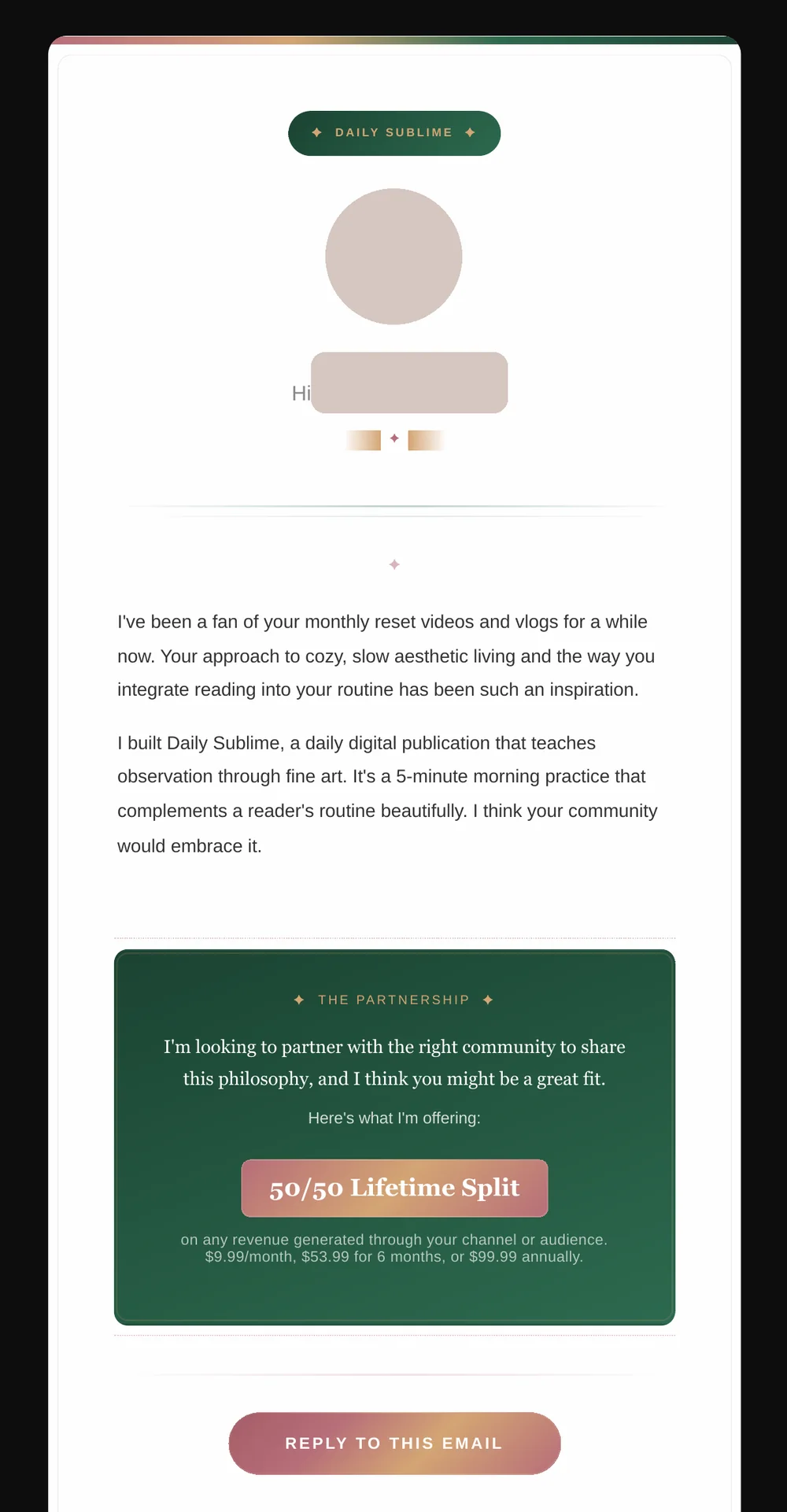
Finds creators and drafts a personal email to each, for me to check and send.
- I type a topic in n8n's chat.
- A scraper finds up to 10 YouTube creators with a public business email.
- n8n adds each creator to a Google Sheet as Pending.
- Claude writes a personal email from the creator's channel description.
- n8n puts it into the designed email, saves it as a Gmail draft and marks the row Drafted.
- I read each draft and send it myself.

The creator outreach workflow in n8n. Swipe sideways to see all of it.
What building it looked like
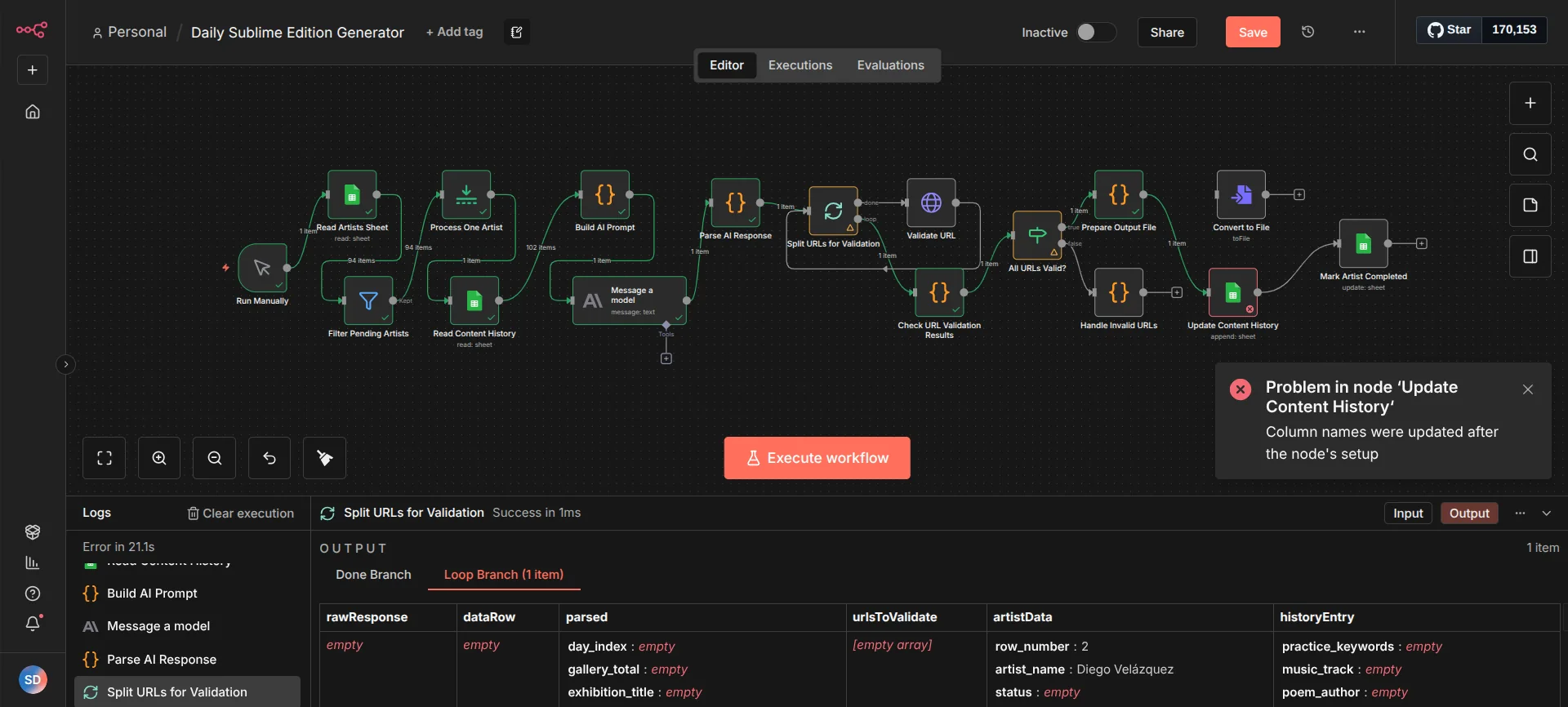
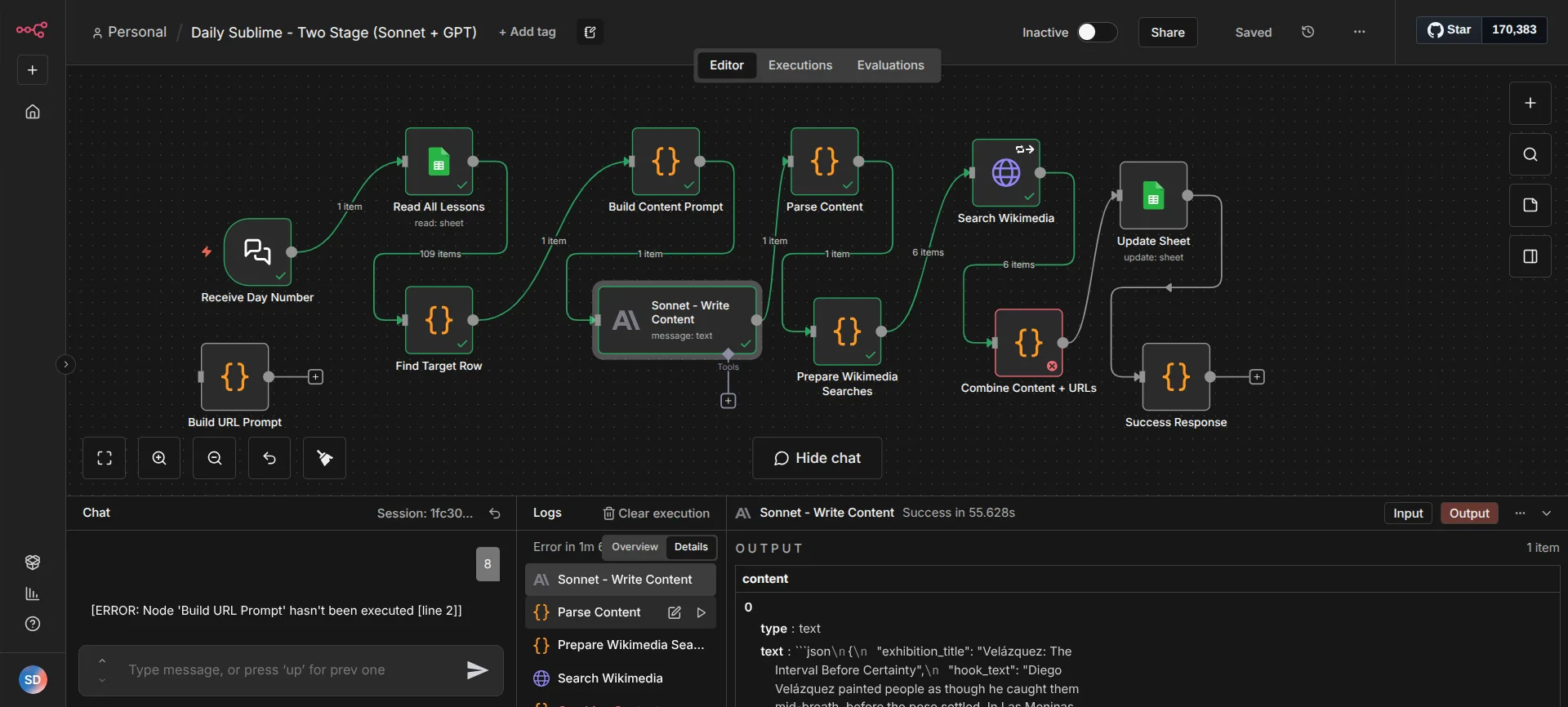
What came out
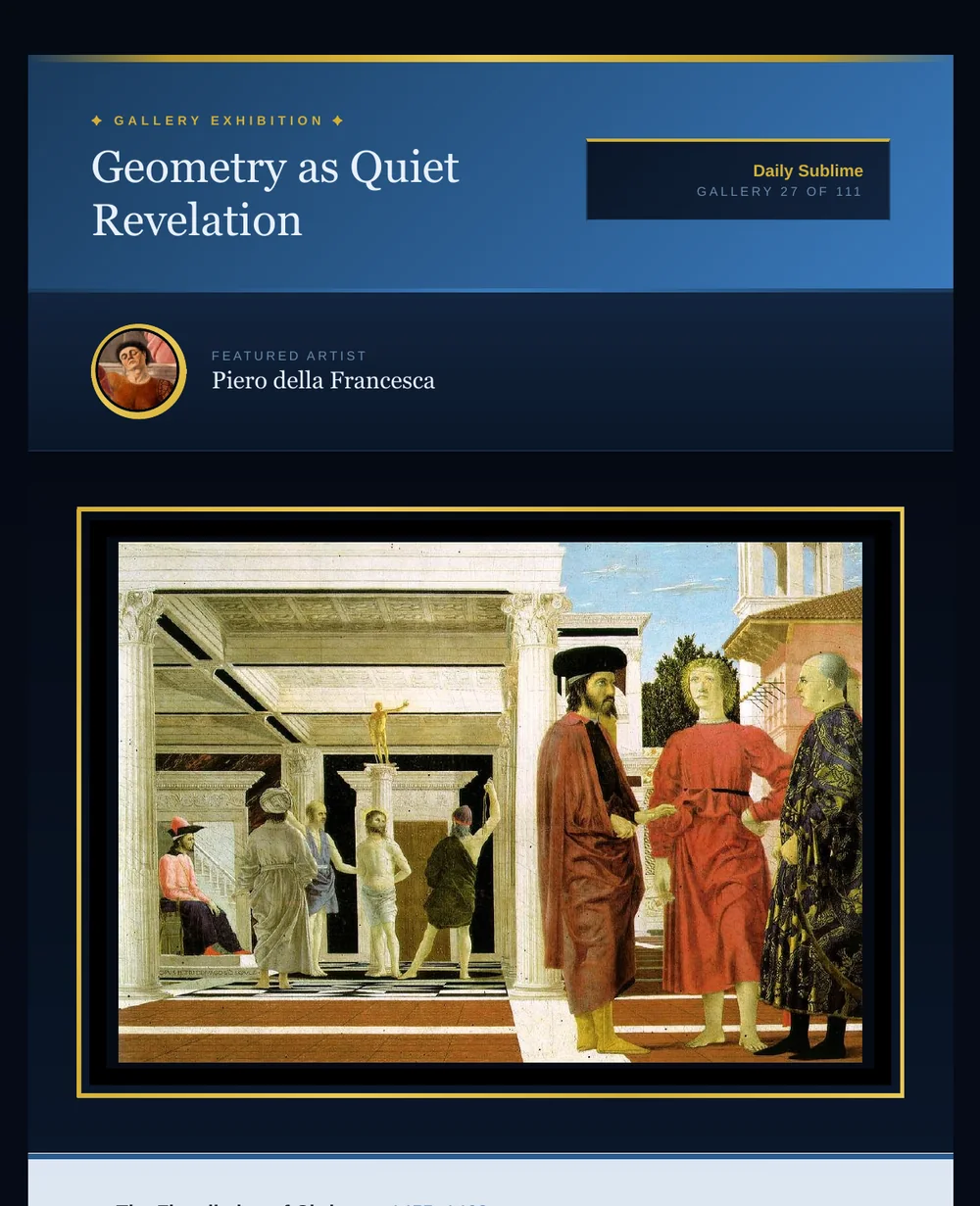
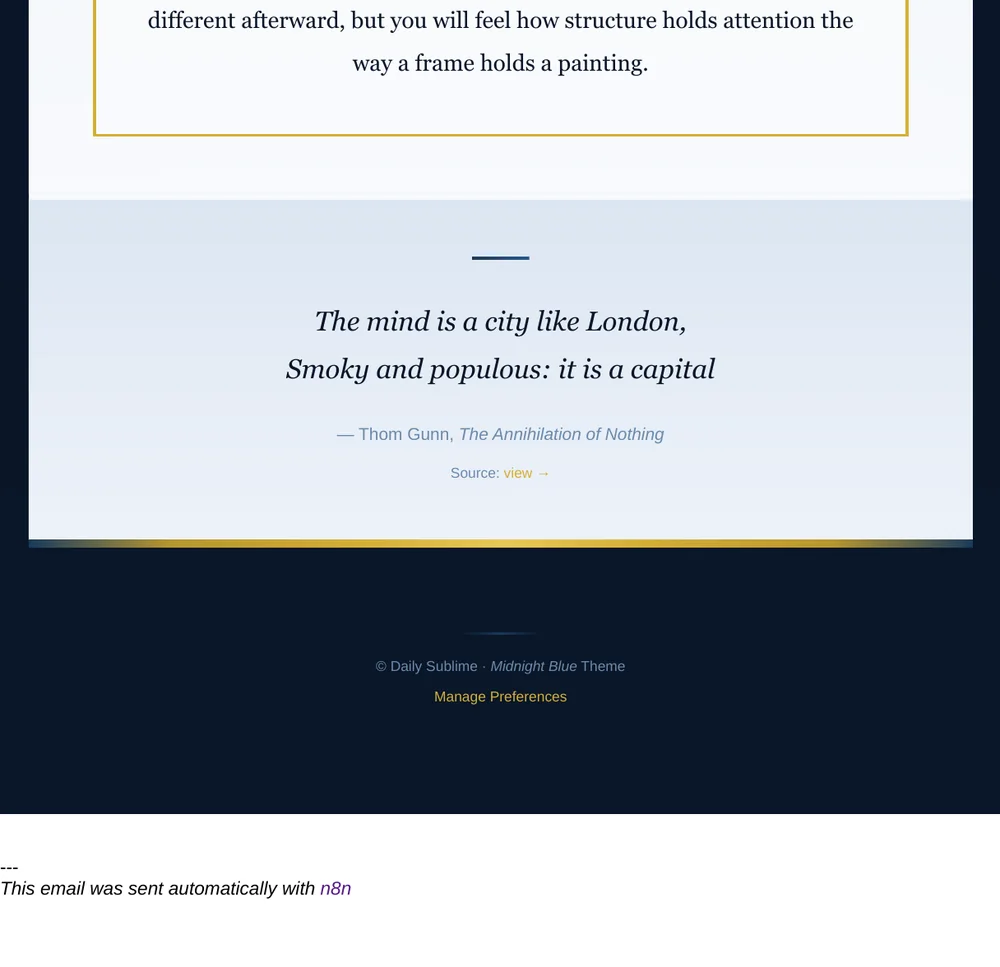
What it changed
- Writing an issue by hand means researching a painter, choosing the works, finding a true story and a poem, and finding six pictures that open. The workflow does that in one run; Claude's writing step took 55.6 seconds in the test shown above.
- Each reader got the issues in order at 8:00 in the morning, in a designed email with seven color themes, one for each weekday. The sheet tracked which issue each reader was on.
- Outreach went from finding people and writing every email from scratch to typing a topic and checking up to 10 personal drafts.
- About 80 personal emails to creators went out between 17 January and 1 February 2026.
The dark screens are my own n8n editor in January 2026. The light pictures are my exported workflows in n8n's workflow viewer, with logins and prompts removed.
Trade-offs that shaped Daily Sublime Automation
- Outreach emails stop as Gmail drafts instead of being sent by the workflow: slower, but nothing reaches a stranger unread.
- Google Sheets as the only database: easy to read and to fix by hand, not built for scale.
- One issue per run instead of a whole batch: slower, but a bad run costs one issue, not thirty.
- Pictures come from Wikimedia Commons: free and reliable for old masters, thin for modern painters, so some issues needed pictures placed by hand.
Decision log
Each decision, the hypothesis behind it, how it was tested, and what came of it.
| Challenge | Hypothesis | Method | Outcome |
|---|---|---|---|
| Picture links written by the AI often did not open. | A language model is good at writing and unreliable with exact addresses, so the links should come from the source. | Three attempts in two days: a loop that tested every link, a second model only for links, then a search of Wikimedia Commons for each painting. | From issue 8 the pictures came from the Wikimedia search. It found all six pictures for 15 of the next 24 issues; I placed the rest by hand, mostly for modern painters. |
| Thirty issues can start to repeat themselves. | The model repeats less when it sees what earlier issues already used. | Before each run, n8n collects the practices, music and poems of all earlier issues and tells Claude not to reuse them. | No practice and no piece of music repeats in 31 issues. Four poems do, so a rule in a prompt reduces repeats but is not a guarantee. |
| An email written by AI and sent to the wrong person costs trust. | Automation is easier to trust when it stops before the step that cannot be undone. | The outreach workflow saves every email as a Gmail draft and marks the creator as Drafted in the sheet. Sending stays manual. | I read each draft before it went out. About 80 emails were sent between 17 January and 1 February 2026. |
| A daily magazine has to arrive every day at the same time. | A fixed morning time turns reading into a routine. | The sheet stores which issue each reader is on. n8n sends the next issue at 8:00 and moves the reader forward. | Issues went out at 8:00 in the morning between December 2025 and March 2026. |
Key features
- Issue writer (n8n and Claude)
- Picture search on Wikimedia Commons
- Link checker
- Do-not-repeat list from earlier issues
- Scheduled sending at 8:00
- Creator outreach as Gmail drafts
- Seven color themes, one per weekday
- Sign-up form to Google Sheets
n8n · Claude · AI Automation · Human-in-the-loop · Email Automation · Google Sheets
(Contact)
Need work like Daily Sublime Automation on your team?
Based in Milan, Italy · Available in Milan, Turin, across Europe and remotely · English, Italian, Persian, German · LinkedIn